
Home › Forums › System Ninja Support › Bug found
- This topic has 84 replies, 7 voices, and was last updated 9 years, 4 months ago by
Shane Gowland.
-
AuthorPosts
-
March 5, 2013 at 3:13 pm #8484
Phobos
ModeratorSmall field.
Attachments:
May 7, 2013 at 12:53 am #8670ModeratorBug with a small field on a screenshot at the top is still not fixed.
All files are measured in kilobytes. Sorting by size is not working correctly.
If translated into Russian “Search …” in the search field, the phrase is not automatically cleared when you put the cursor.
Search is case sensitive.
Does not create a log with no translated strings.
May 7, 2013 at 10:33 am #8671Shane Gowland
KeymasterDoes not create a log with no translated strings.
The update would have disabled this. Did you rename output_string.false to output_strings.true?
All files are measured in kilobytes. Sorting by size is not working correctly.
Files will only be shown in kilobytes to make comparing more accurate. As for the comparison failure, does it work if you switch to English?
If translated into Russian “Search …” in the search field, the phrase is not automatically cleared when you put the cursor.
Will investigate this.
May 7, 2013 at 11:32 am #8672ModeratorDid you rename output_string.false to output_strings.true?
That’s the first thing I do.))
As for the comparison failure, does it work if you switch to English?
Does not work correctly.
Attachments:
July 11, 2013 at 4:11 pm #8823KeymasterDoes not create a log with no translated strings.
This has been fixed. Update coming soon.
July 11, 2013 at 4:14 pm #8824KeymasterIf translated into Russian “Search …” in the search field, the phrase is not automatically cleared when you put the cursor.
Also fixed in upcoming release.
July 14, 2013 at 12:00 am #8895ModeratorSettings the Drive selection mode is reset the default if you change the language and program will automatically restarted.
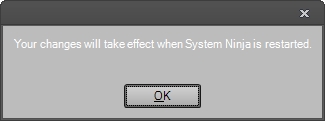
The phrase “Your changes will take effect when System Ninja is restarted.” In rare cases, it may appear on a very dark background. It is during change language.
A very strange thing. If you enable English language that has a section in Settings called “Scan Exclusions”. If you enable Russian language and not translate this phrase in the file localization will be displayed “Ignore Files”.
Attachments:
July 17, 2013 at 3:19 pm #8905ModeratorOpen any browser. Run Scan For Junk. Skip warning message On Russian language. Cancel the scan. Run again Scan For Junk, now a warning message and button (Skip; Close All Browsers) in English.
July 20, 2013 at 12:58 am #8909ModeratorI’m not sure that this is a bug, maybe Shane’s idea.) If you select multiple files, you can not delete them, or add an exclusions from the context menu.
July 21, 2013 at 8:11 pm #8926KeymasterIf you select multiple files, you can not delete them, or add an exclusions from the context menu.
Yes, that’s intentional.
-
AuthorPosts

- You must be logged in to reply to this topic.