

Forum Replies Created
-
AuthorPosts
-
Shane Gowland
KeymasterHello,
If you have the “Update cleaning rules and language files automatically” option enabled, the Zemana cleaning rule should be removed next time you open System Ninja.
Regards,
Shane
KeymasterThank you.
KeymasterI’ve passed this along, thank you.
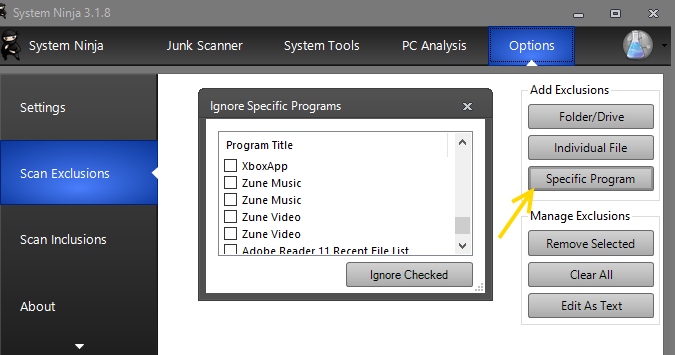
In the mean time, you can exclude Zemana by going to Options -> Scan Exclusions -> Specific Program and choosing Zemana. See screenshot.
You can also right-click on the Zemana files on the scan results page and select “Ignore files of this type”
-
This reply was modified 8 years, 11 months ago by
Shane Gowland.
KeymasterHi John,
We’ve never offered lifetime memberships. A Pro Club subscriptions provides one year of downloads and support and it looks like yours expired on October 28th of 2016.
Regards,
Shane
KeymasterThank you. 🙂
KeymasterThank you.
KeymasterThank you!
KeymasterNo problem, Greg.
We’re extremely grateful to anyone who recommends our product. Thank you for the support!
Kind regards,
Shane
KeymasterHi Kevin,
We’ve never had a $50 license. The Pro Club includes access to System Ninja Pro (and future Pro products) which you can use/install on any computer you administrate—including in a technician capacity.
Regards,
Shane
KeymasterHi Greg,
The free version of System Ninja removes temp files—including browser caches—from all user accounts, as long as the current account has permission to do so.
The portable pro version contains all of the features from the free version, including this one.
Regardsm
Shane
-
This reply was modified 8 years, 11 months ago by
-
AuthorPosts