
Forum Replies Created
-
AuthorPosts
-
Shane Gowland
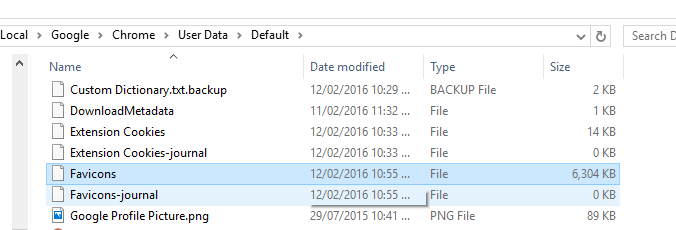
Keymaster\Favicons isn’t a folder, it’s a file without an extension.
 Keymaster
Hi Poppa,
Go to Options -> Scan Exclusions and add Chrome’s favicon file to the exclusion list.
The path should be C:\Users\{username}\AppData\Local\Google\Chrome\User Data\Default\Favicons
KeymasterStartup Manager. Function Highlight Unnecessary Items.
Can we influence the expansion of the list? Suggest our options.The list is currently hard-coded in, however I’ve been thinking about ways to redesign this feature and will work on making it extensible in the future.
KeymasterLooks like you’ll have to do it by process of elimination.
KeymasterIt’s back. Now with correct SHA-1/SHA-256 values.
KeymasterAt a guess, I would say: C:\Users\{username}\AppData\Roaming\Microsoft\Office\Recent
That location is cleaned by the Office 2013 entry that’s included with CCleaner and has nothing to do with CCEnhancer.
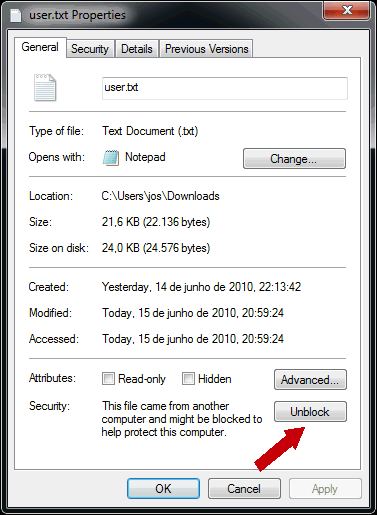
KeymasterHi Gary, you should be righting clicking and going to the Properties screen. From there, click the button that says “Unblock” as shown in this screenshot.
KeymasterWill fix, thank you.
KeymasterYou’ll need to use the installer to create your own portable edition of System Ninja if you’re a free user.
We had to remove the .zip file version due to issues with Windows 10 that dramatically increased our support burden. We now offer that file only to Pro Club users.
KeymasterFinally, was this from an installer you downloaded here or from a third-party website?
-
AuthorPosts