

Forum Replies Created
-
AuthorPosts
-
Shane Gowland
KeymasterThank you very much! 🙂
KeymasterIt’s still working as described here, too. Could you please share specifically what problem you’re encountering and what operating system you are using?
KeymasterThank you 🙂
KeymasterI would strongly recommend using trim.bat until I have a chance to update all of my winapp2.ini related code.
does it support “Detect1″/”Detect2″ etc?
It will only check the first Detect.
does it remove entries with valid “Detect” but nothing to delete?
No, it doesn’t parse the FileKey lines at all.
test with installed chrome, all chrome winapp2 entries removed
SPECIAL_DETECT_CHROME is not supported, however Opera (pre-chromium), Firefox and Thunderbird are.
KeymasterWill be resolved in System Ninja 3.0.7, coming this weekend.
KeymasterUse the Russian file as your starting point.
KeymasterCleaning entries added by CCEnhancer will have an asterisk next to them.
KeymasterHi John,
You may need to add Remembr to Norton’s exclusion/ignore list. Unfortunately a lot of anti-virus products mistake Remembr for spyware because it is constantly recording data from the clipboard.
KeymasterTry right clicking on the button and selecting “Save Link As”
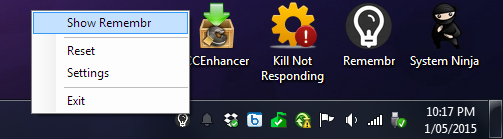
KeymasterHi, once you hide Remembr you can make it appear again by double clicking on the Remembr taskbar icon or right clicking on the icon and selecting “Show Remembr”
-
AuthorPosts