
Forum Replies Created
-
AuthorPosts
-
Shane Gowland
KeymasterFirefox history and cache should be deleted. Could you share the path to your Firefox user profile so I can troubleshoot why yours isn’t being detected?
KeymasterShort answer: Yes.
Long answer: Every system is different, so it’s impossible for System Ninja (or any cleaning program) to have 100% accuracy and safety 100% of the time. System Ninja has been downloaded roughly 2,000,000 times and the number of known instances of a non-junk file being deleted can be counted on one hand.
KeymasterKeymasterI’m planning on improving that panel a lot in 2.1. Will definitely add a close button.
Good to see you using the new Carbon theme. I hope you like it..? 🙂
KeymasterThank you! 🙂
KeymasterYes, that’s normal behavior when run on newer versions of Windows.
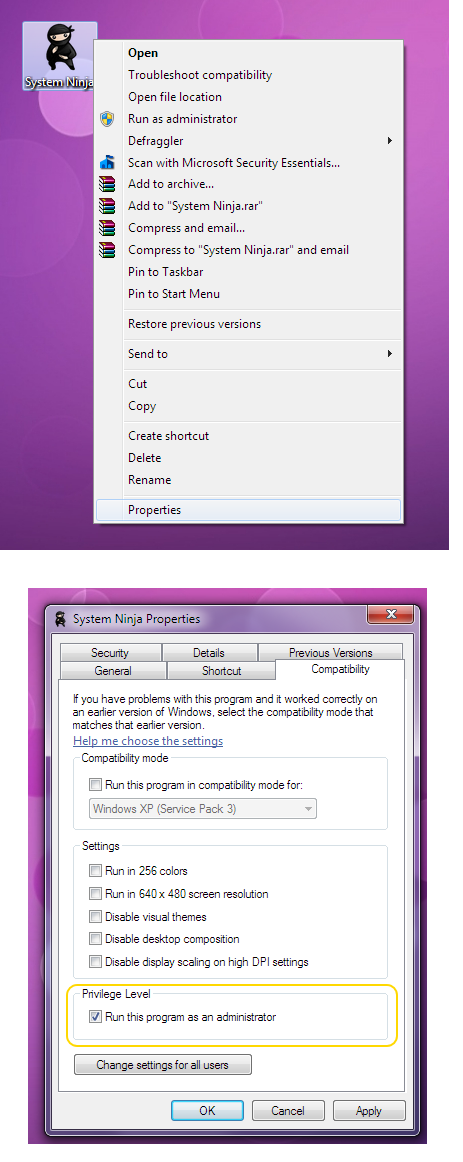
You can set System Ninja to always have administrator rights, so you will only have to click “yes” once. This can be achieved by right clicking on the shortcut, selecting ‘Properties’ and ticking “Run As Administrator” in the compatibility tab.
See screenshot for details:
 Keymaster
Can you show a screenshot? Based on your description, it sounds like the standard User Account Control popup that appears whenever a program that accesses the file system is run.
Does it look like these popups?
KeymasterI believe it does close to the tray when the /AUTO argument is passed. Could you confirm whether this is the case.
Thanks.
KeymasterCCEnhancer has its own trimming functionality built in, that; unlike Trim.bat, actually parses the winapp2.ini file rather than handing that task over to CCleaner. Once confident that Trim has parity with CCleaner’s parser, the option to run it automatically after each update will be enabled.
An entirely new winapp parser is currently in development and should be deployed to CCEnhancer, Trim.exe, WinappDebug and System Ninja by the end of the year.
KeymasterThanks @dvdbane. I’ll add a filter to remove duplicates for 3.0.3.
-
AuthorPosts