
Forum Replies Created
-
AuthorPosts
-
Shane Gowland
KeymasterThank you very much. I’ll get this added to the download file in the next couple of days.
KeymasterVersion 4.0 (just released) includes this feature.
KeymasterWow, what a strange response to a failed web connection.
I’ll get it resolved in the next version. Thank you for investigating! 🙂
June 7, 2014 at 1:34 pm in reply to: OldChromeRemover – Remove Obsolete Google Chrome Versions #10025KeymasterHi fenno,
Unfortunately OldChromeRemover uses environmental variables to determine the folder paths, so it won’t work on inactive user accounts.
There is a way to override the path variables manually, but it would be faster (and easier) to delete the old chrome files and folders manually.
KeymasterI’ve not been able to reproduce this issue.
Do you have access to a PC running a non-Russian version of Windows? It could be a bug caused by number formatting or something else weird.
KeymasterGlad you got it resolved. I’ll look into this issue to see why they initially didn’t show.
Can you share any details about your system? OS/.NET version etc.
KeymasterI will investigate this.
KeymasterHi Fox,
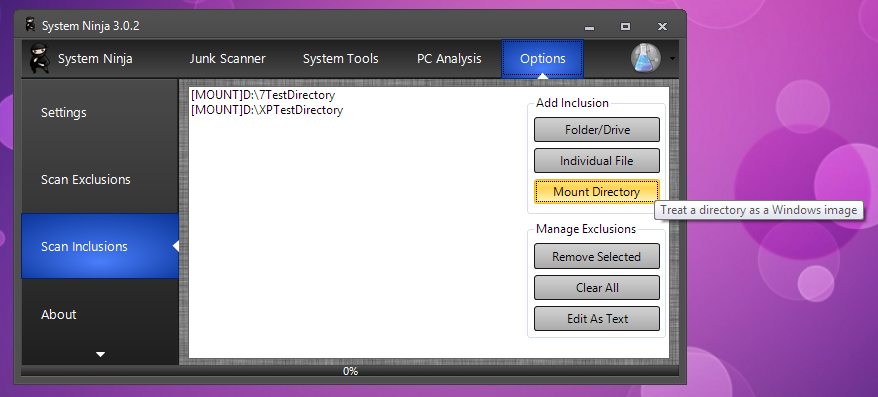
If you’re a System Ninja Pro user, you can mount the D:\ drive using the ‘Mount Directory’ tool. In order for this to work, the Firefox profile on D:\ must be located in C:\Users\{name}\AppData\Mozilla\Firefox\Profiles
Free users can use the “Folder/Drive” option in the Scan Inclusions menu. You will need to manually include each directory and select the file extensions you would like removed.
Attachments:
KeymasterWindows will place System Ninja in the middle of the screen at the normal size before the previous window size can be applied. This causes the extra width to be assigned after the Draw() event, leading to half the app being hidden.
Something like this could resolve the problem:
int screen_size = SystemInformation.VirtualScreen.Width;
if (app_size > ((screen_size / 2) - 1) {

   this.Location = new Point(this.Location.X - (screen_size / 2), this.Location.Y);

}
Unfortunately, that would cause all sorts of new problems on systems with multiple monitors or an app that allows multiple desktops. Checking for these conditions adds a lot of extra complexity that makes this issue not worth fixing.
Sorry.
KeymasterThank you! 🙂
-
AuthorPosts